


Fog of War Labs

What is SC4J?

Simulation Core for Java

SC4J is the open-source real-time strategy engine we build at Fog of War Labs. Written in Java, it handles unit movement, combat, rendering, and replays. Games ship as mods you can choose and run from a single launcher.

The launcher is also where players meet. Each launcher joins Beacon.Link as a peer on a decentralized network. You can see which friends are online, chat, and find a room to play together.

Mod gallery

Launcher catalog

SC:R brings the rules of StarCraft: Remastered to SC4J. We use maps and replays from the community to reproduce and fix EUD behavior differences, crashes, and desyncs.

Requires your own StarCraft: Remastered installation. Supported build 1.23.10.

Install in the launcher
  1. Copy this mod's address. In the launcher's Mods tab, click Install mod and paste it into the GitHub repository field.
  2. Click Next. Check the mod name and release version, then click Install.
  3. Select StarCraft: Remastered in the mod list. If the game folder isn't detected, click Browse next to StarCraft: Remastered folder and choose the original installation folder containing .build.info. Then click Run.
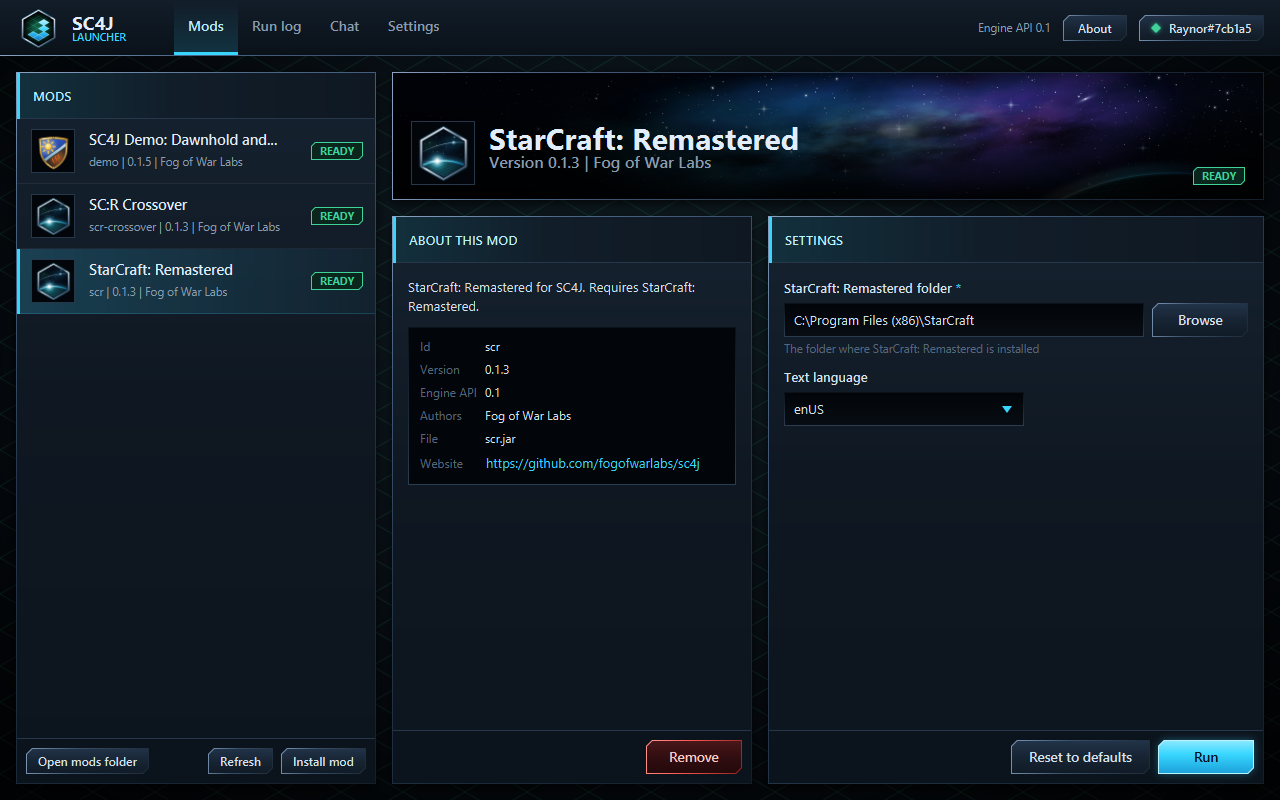
SC4J v0.1.5 Mods tab with Install mod at the lower left, the original game folder setting on the right and Run at the lower right.
Source code Report an SC:R compatibility issue

CrossOver adjusts Marine stats and adds two units, the Terran Unity-chan and the Zerg Myriarch. It overlays those changes on the SC:R source to build a standalone mod.

Requires your own StarCraft: Remastered installation.

Install in the launcher
  1. Copy this mod's address. In the launcher's Mods tab, click Install mod and paste it into the GitHub repository field.
  2. Click Next. Check the mod name and release version, then click Install.
  3. Select SC:R Crossover in the mod list. It shares the SC:R game folder setting. If StarCraft: Remastered folder is blank, click Browse and choose the original installation folder containing .build.info. Then click Run.

SC4J v0.1.5 Mods tab with Install mod at the lower left, the original game folder setting on the right and Run at the lower right.
Source code

Play Dawnhold against Cindermaw in a real-time strategy demo built on SC4J.

Included with SC4J. Under Mods in the launcher, select SC4J Demo: Dawnhold and Cindermaw and click Run.

Source code

The first area of investigation is auto-mining through existing game commands. We also plan to explore restoring GRP support through EUD triggers and adding client-side rollback netcode.

Extended is planned as an overlay on the SC:R source, following the approach used by CrossOver.

Download the SC4J launcher

Download the Windows ZIP, extract it, and run SC4J.exe. The package includes a Java runtime.